rssHQ / Roadshow Staffing
A Recruiting Pipeline Built Around the Next Decision
Designing a production recruiting system so Roadshow Staffing could move applicants through weekly event staffing with clear actions, workflow gates, and traceable history.
Roadshow Staffing helps brands run product demo programs in warehouse clubs nationwide. Their operation depends on recruiting, training, deploying, and supporting the right people every week. rssHQ started as a request to clean up an Airtable recruiting pipeline, but the deeper issue was not the base itself: recruiters were using names, outreach notes, and statuses to carry work the system could not.
Role
Product Designer
I owned product framing, discovery synthesis, UX, workflow logic, data model, and production build.
Collaboration
Founder, manager, recruiter
Worked from recorded discovery sessions and live staffing workflows, not abstract requirements.
Status
Production rollout testing
Working product behavior before broader deployment: applicant profiles, gates, links, emails, scheduling, and activity history.
Context
Airtable showed status. It did not drive the next decision
Roadshow's Airtable pipeline gave the team shared visibility. Recruiters could see applicants, events, and pipeline stages in one place.
But visibility was not the same as workflow confidence.
Recruiters still had to send emails, watch for responses, coordinate interview times, check documents, request references, update statuses, and leave enough notes for someone else to understand what had happened. The pipeline showed where an applicant sat, but it did not reliably show what decision needed to happen next.
Cleaning up Airtable would have improved the surface. It would not have changed the operating model. The useful improvements depended on more seats, premium integrations, connector tools, and manual administration, especially for a business that would need to bring contract recruiters on and off the system.
Product thesis
The pipeline worked better when every applicant state answered one question: what decision needs to happen next?
Discovery
The workarounds were the requirements
I ran recorded, transcribed discovery sessions with Roadshow's founder, manager, and recruiter. We walked through the live Airtable setup, traced the recruiting process from application to offer, and identified where recruiters relied on memory, shorthand, manual follow-up, or side-channel communication.
The team had already created workarounds that showed what the system needed to understand.
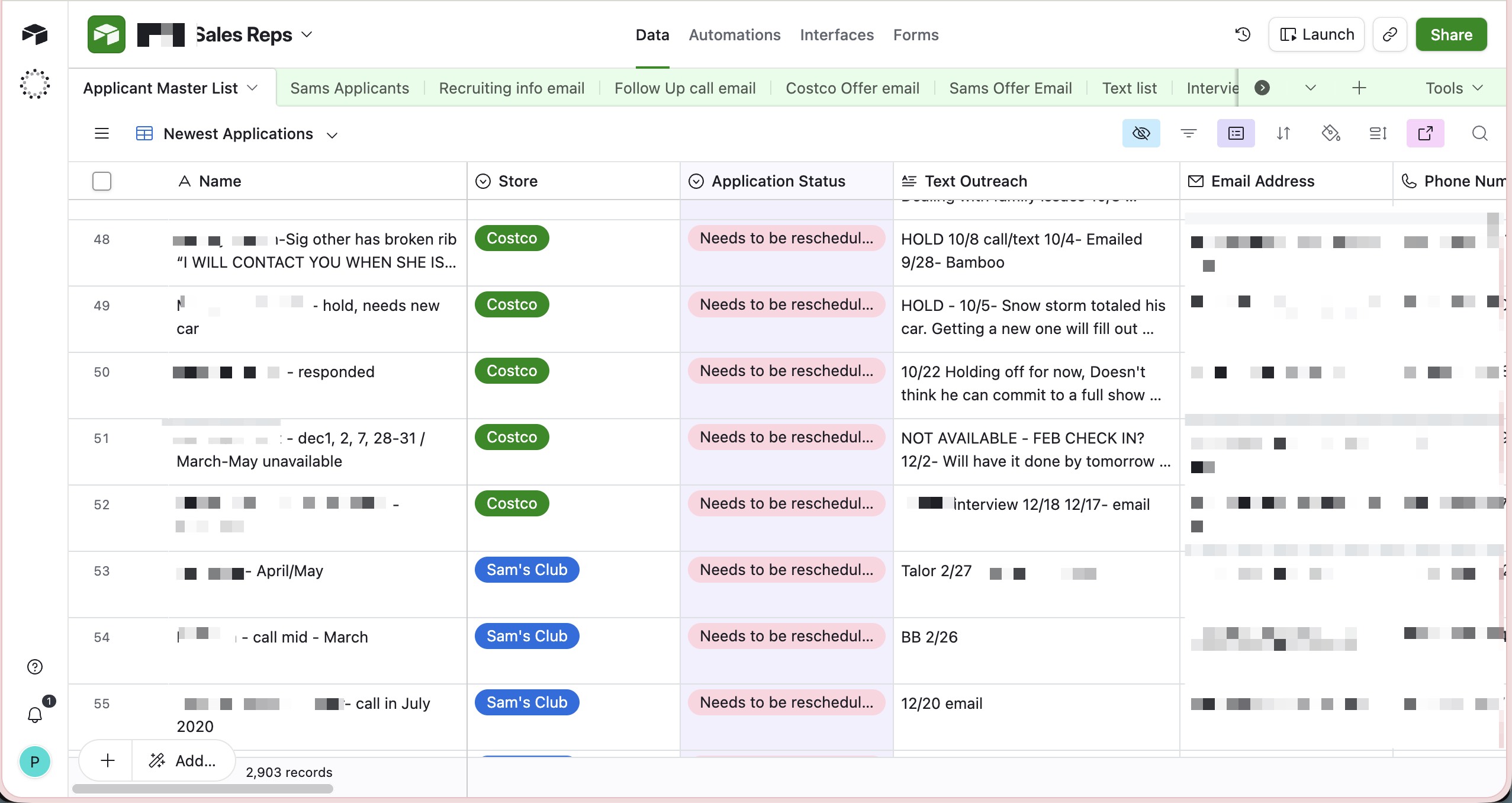
Names carried context
Recruiters put urgent information where teammates were most likely to see it first.
Outreach became the activity timeline
Text fields held calls, voicemails, reminders, and shorthand, but not in a consistent way.
Statuses mixed too many jobs
A status could mean lifecycle stage, reminder, missing task, recruiter judgment, or follow-up moment.
Traceability mattered more
The founder needed a cleaner record of decisions, tasks, documents, status changes, and reasons.
To keep applicants moving, the pipeline could not just describe where someone sat. It had to make the next recruiting decision obvious.
Design reframe
The applicant state became a prompt for action
Instead of asking recruiters to move applicants through statuses, rssHQ asks recruiters to make the next decision.
A status still exists, but it is not the main interaction. It is the result of something meaningful happening: an invite was sent, an interview was scheduled, notes were added, an offer went out, a candidate was placed on Hold, or someone was kept Warm for later.
That reframed the applicant profile as the recruiting command center. A recruiter or manager should be able to open one profile and understand where the applicant is, what already happened, what is blocking progress, what action is available next, whether required documents and references are complete, and why someone was paused, moved forward, or manually overridden.
Applicant-centered workflow model
01
Applicant state
Where is this person now?
02
Recruiter decision
What should happen next?
03
System action
Send, schedule, log, gate, update.
04
External steps
Applications, documents, references, and scheduling.
05
Activity history
What can the team trust later?
Once applicant state became a design surface, the first question was what each state should ask the recruiter to decide.
Decision 01
Each state made the next call visible
In Airtable, status was doing too much. It told the team where someone might be in the pipeline, but the recruiter still had to interpret what that meant and decide what to do next.
Someone could be "interviewing," but that might mean the invite was sent, the interview was scheduled, notes were missing, or a recommendation was ready. The only way to know was to open the record and reconstruct the history.
I designed the applicant detail view around contextual actions instead of a generic status menu. When an applicant is ready for the next business decision, the system asks the recruiter what should happen next. In a Recommended state, for example, the available actions are not abstract statuses. They are choices: Send Offer, Warm, Hold, or Pass.
Recommended-state action panel
Tension
Statuses described where someone might be. They did not tell a recruiter what accountable choice needed to happen next.
Recommended applicant
Send Offer
Warm
Hold
Pass
The interface centers the next recruiter decision instead of asking the recruiter to translate that decision into a status update.
Design move
Expose contextual decisions from the applicant state: Send Offer, Warm, Hold, Pass.
Loose flexibility
Keep a generic status menu and let recruiters decide what each label meant in the moment.
Why it mattered
The old flexibility was hiding work in memory. rssHQ made the next responsible action visible.
Showing the next decision was not enough. The decision had to trigger the work recruiters were previously doing by hand.
Decision 02
Decisions triggered the work
Before rssHQ, inviting someone to interview required a manual cascade: decide the applicant should move forward, draft or find the right message, send the email, watch for a response, coordinate a time, add the interview to a calendar, and return to Airtable to update the record.
Every step depended on the recruiter remembering to do the next one. Every manual handoff created a chance for the applicant to stall.
I designed rssHQ so the recruiter's decision starts the workflow. When a recruiter takes an action, the system can send the right communication, open scheduling, update applicant state, and record activity history. The recruiter does not have to separately maintain the status after doing the work somewhere else.
As a designer with implementation fluency, I used AI-assisted development to turn the workflow model into production behavior: branded emails, applicant-specific links, internal scheduling, NDA/reference gates, and activity history. That reduced Roadshow's dependence on Airtable seats, premium integrations, connector tools, and a larger vendor-heavy build before the team could test the product in production.
Interview invite flow
Before
Seven manual steps
Email, scheduling, calendar coordination, response tracking, and Airtable status maintenance.
After
One contextual action
The decision starts the invite flow and updates the applicant record.
Design move
Let a recruiter's action send communication, open scheduling, update state, and record history.
Simpler surface
Make the status interface cleaner while leaving emails, scheduling, and record updates as separate manual tasks.
Why it mattered
The system made the recruiter's decision operational. The deeper value was confidence that the work happened and the next person could understand the record.
Once decisions triggered work, every outside step had to return to the applicant record so the team could trust what happened.
Decision 03
External steps returned to the applicant record
The applicant profile could not become a reliable source of truth if the most important steps happened somewhere else.
Applications, NDAs, references, interview scheduling, email reminders, and event-specific links all happen outside the recruiter's immediate view. If those steps stayed disconnected, rssHQ would recreate the same problem Airtable had: important context spread across tools, tabs, and memory.
I built applicant-specific and event-specific flows so external actions returned to one profile. The applicant profile became the place where outside steps returned and became visible.
Outside steps return to one record
Application
Event-specific links connect applicants to the right role, client, and location.
NDA
Applicant-specific NDA links connect document completion to the applicant profile.
References
Reference links connect responses back to the applicant.
Scheduling
Internal scheduling creates interview records and sends emails to the recruiter and applicant.
Branded templates send the right message at the right stage.
Activity history
Status changes, reminders, notes, and decisions remain traceable.
Design move
Applicant-specific links and flows connected outside actions back to the applicant profile.
Hidden complexity
Let documents, references, scheduling, email reminders, and event links remain distributed across tools.
Why it mattered
That complexity belonged in the system, not in the recruiter's head. The profile showed state, documents, references, scheduling, notes, and history together.
When progress became easier, the system also had to prevent applicants from moving forward before required work was complete.
Decision 04
Gates protected progress. Exceptions stayed accountable
Roadshow's workflow had real requirements. Applicants should not be interviewed before signing the NDA. They should not receive an offer before providing the required references.
But real operations always have exceptions. Someone may sign outside the system. A recruiter may need to recover from an edge case. A manager may need to move someone forward for a valid reason.
I designed gates with accountable escape hatches. If an NDA is missing, rssHQ makes the blocker visible and gives the recruiter a direct reminder action. If an applicant has not met the reference requirement, the offer path stays blocked until the requirement is satisfied.
Structured progress with accountable exceptions
Gate
NDA required before interview
The blocker stays visible and gives the recruiter a direct reminder action before progress continues.
Override
Manual exception with reason
Exceptions remain possible, but the reason becomes part of the record instead of disappearing into side conversations.
Product move
Block progress when required steps are missing, while allowing manual overrides with notes.
Faster path
Let recruiters move quickly through edge cases without forcing the reason into the record.
Why it mattered
The system slowed people down only when a decision affected compliance, process integrity, or team trust.
Not every strong applicant belonged in the active queue. Some needed to remain findable for a future event or backup need.
Continuity
Relationship memory stayed outside the active queue
Not every applicant needed an immediate yes/no decision. Some were promising but unavailable, better for a future event, or worth keeping close as backup.
I separated active progress from longer-term continuity. Warm preserved future or backup candidates without cluttering active review. Hold paused someone for a known reason, with the reason attached to the applicant record.
That kept the active queue clearer without losing people Roadshow might need later.
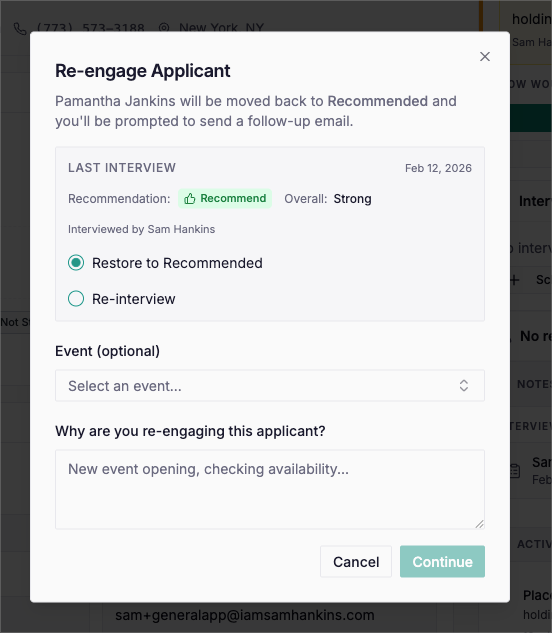
Together, these choices changed the pipeline from a status tracker into a decision system: clear next actions, visible blockers, and a record recruiters could trust.
Proof
The pipeline became easier to move and easier to trust
rssHQ is in production testing before broader rollout. The flows shown here are working product behavior, not speculative mockups.
The clearest workflow reduction is the interview invite flow: what previously required seven manual steps across email, scheduling, calendar coordination, and record updates now begins with one contextual action.
The deeper outcome is workflow confidence. Recruiters have more confidence about where applicants are in the process because status, blockers, documents, references, scheduling, notes, and next actions live in one applicant-centered workflow.
7 to 1
steps in the interview invite flow, from a manual cascade to one contextual action
rssHQ
Before and after
Recruiters manually updated statuses after doing work elsewhere.
Applicant states expose the next decision.
Interview invites required a manual cascade across email, scheduling, calendar, and Airtable.
One contextual action starts the invite flow.
NDAs, references, and scheduling were tracked separately.
Required steps return to the applicant profile.
Applicants could appear stuck unless someone decoded notes or statuses.
Blockers and next actions are visible in context.
Exceptions could disappear into side conversations.
Overrides and Holds require reasons.
Because rollout is still early, I am not claiming scaled adoption metrics yet. The strongest evidence is the shipped workflow behavior: rssHQ reduces manual coordination, makes applicant state easier to trust, and gives recruiters and managers one place to understand each candidate's path through the process.
The work did not disappear. It became visible, sequenced, and easier for the team to trust.
The durable lesson was bigger than rssHQ: workflow design should clarify the next responsible decision, not just record that progress happened.
Reflection
The real unit of work was the recruiter's decision
When a team overloads names, notes, statuses, and side-channel follow-up, the answer is rarely just cleaner taxonomy. It is usually a sign that the product is missing the real unit of work.
For rssHQ, the real unit was the recruiter's decision and everything the system needed to carry after it: the next step, the blocker, the exception, the reason, and the record someone else could trust later.
A workflow system should not just describe progress. It should make the next responsible decision clear.